
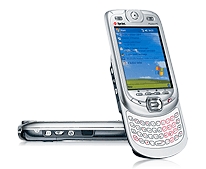
 The new Harrier phone, available to business customers of both Verizon as the XV6600 and Sprint as the PPC-6601. They will be released to consumers any day now.
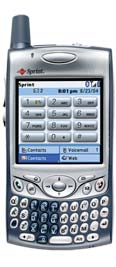 The other phone I'm playing with is the Treo 650 from palmOne. It runs only on the Sprint network. But try as I might, I have yet to get it to work. That's because I'm trying to install it on a machine that was set to work with the Treo 600 and it's loading all the programs and extra apps I have on that earlier version.
Josh... don't tell me that I'll buy it.... I can't afford any more HT toys!!! My wife will kill me.
It really is a very bright screen, isn't it? And that video camera is mighty cool.
You like Missing Sync better than iSync?
iSync still relies on a HotSync architecture to sync Palm PDA's -- so there's not really a point in "comparing" them. I like Missing Sync better than Palm's outdated Hotsync architecture though. And since I use Now Up-to-Date and Contact over Apple's Address Book and iCal, I don't really use iSync all that often.
The Treo 650 certainly has flaws (the memory issue and it's high price tag being the most notable) but IMHO the "good" on this product very much outweighs the "bad." Bluetooth is sublime (especially with Salling Clicker on the Mac) and the higher-res screen is the biggest advantage. Prior to ownership that was the lowest thing on my wish list, and now I can't imagine going back to anything less.
Posted by: Josh at December 14, 2004 09:22 PMMaybe you could just create a new user and Hot Sync from there. The new user should have no access to your "real" data. Just make sure that you log out, not just Fast User Switch. Some of those apps running in the background could muck up the installations.
Posted by: imacguy at December 15, 2004 12:40 AMMike -- Some has already created some hacks so that the BT connection on the 650 can be used with a laptop as a modem:
http://www.treocentral.com/content/Stories/491-1.htm
and also to get the PalmOne SD WiFi card to work.
http://www.treocentral.com/content/Stories/502-1.htm
I just want the version WITHOUT the camera, so I can actually use it at work!
Posted by: Ron at December 17, 2004 11:30 AM
It's not that hard, Mike. Just go to:
"Macintosh HD:Users:yourusername:Documents:Palm:Users:yourpalmname"
...and rename the "Backups" folder to something like "Backups 600."
Then sync your 650 as a fresh new PDA, sort of like a "clean install." It won't load on the old stuff and it won't load on potentially incompatible apps:
http://www.palmfocus.com/treo650software.asp
When you're done testing the 650 all you'd have to do is delete the new "Backups" folder and rename "Backups 600" back to the original.
But you won't do that -- I imagine you'll end up buying the 650, maybe paring down what apps you sync, or just adding a 1 GB SD card to make up for the "memory issue." Because other than that, it really is a very nice upgrade... and still currently the best smartphone on the planet!
On a Mac, I recommend first installing the 650's Palm Desktop, and then installing MarkSpace's Missing Sync:
http://www.markspace.com/missingsync_palmos.php
This way you get the new and improved sync architecture, but also get the slick "Send to Handheld" application that automatically converts (!) and sends pictures and movies to the Treo for portable playback.
Posted by: Josh at December 13, 2004 10:42 PM