
Microsoft is to announce today a new wireless desktop that color-coordinates with the iMac in "lustrous white." Called the Microsoft Wireless Optical Desktop Special Edition, it consists of a multi-function wireless keyboard, a wireless mouse and a small transceiver that plugs into either a USB port or the standard PC mouse/keyboard ports on a PC.
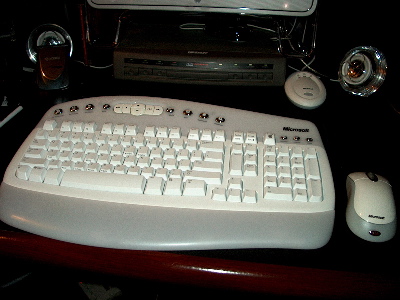 Here's a picture of the one I'm using. MS is targeting these for both PC and Mac users. The only reference in the PR material to Mac is that the wireless "suites" as they're called work with both platforms.
I've been using it with my dual-processor G4 system for a couple weeks now and have found it a most welcome addition. At the top of the keyboard are a series of chrome keys that integrate fine with OS X. A "media" button opens the combo DVD/CD drive. "Mail" brings up my e-mail ap. Other keys open documents, picture files and music files. Beneath the chrome keys, a row of function keys handle basic word processing and e-mail commands like save, open, reply, print, undo and redo, help and so on. There's also a volume control on the keyboard and buttons to bring up the calculator.
I like the size and feel of the keyboard. And being wireless is a huge bonus. It's really nice to sit back, kick my feet up and write a column or answer e-mail with the keyboard on my lap every now and then.
The wireless mouse adds right-click functions for copying and pasting and such and the scroll wheel is a very welcome feature for getting through long documents and moving down Web pages. Because it's an optical mouse with no moving parts, there's no need of a mousepad.
I'm delighted with the system, which has a range of about six feet. It is really nice to get rid of all the wires and cables in front of the monitor and have some freedom to move around a bit.
It should be available in stores soon. Pricing is supposed to be "under $100 for a limited time," says Microsoft. Separately, the keyboard lists out at $84.95 and the mouse at $44.95. The white version is supposed to be available after today. A black version will come out in May. Details should be up on the Microsoft Web site later today.
No Bluetooth.
Posted by: Mac Mike at April 24, 2003 12:35 PMIt looks pretty bulky. How does it feel to hold? I'm refering mostly to the wrist rest and the area on top with all the buttons.
Posted by: Chris at April 24, 2003 12:59 PMThe wrist rest is detachable. But I spend A LOT of time at the keyboard and I find it much more comfortable to use a keyboard that has one. I have always thought the standard Apple keyboard was too small and this one really seems to "click" for me.
I should also point out that I am a hunt-and-peck typist... not a touch typist. I don't know if it would be different if I touch-typed.
I wonder if these wireless keyboards would work with a KVM switch? Right now I am sharing a USB keyboard and mouse between a Dell desktop runing Windows 2000 and my 12" PowerBook.
Posted by: Frank McPherson at April 24, 2003 02:16 PMThis looks like it has the same features and functions as the Logitech Cordless Elite Duo keyboard and mouse, which I've been using since December, on OS X. That combo goes for $99, and it isn't from M$.
Posted by: Karl Groeger at April 24, 2003 11:25 PMChecked the MS site:
There is a Bluetooth keyboard, but it's not in the features grid and doesn't mention Mac compatibility.
Only the Wireless keyboards are Mac compatible. (Most likely, they're the only ones that are likely to compete with Apple keyboards.)
What about battery life? All the site says is that the keyboards require 4 AA batteries. (Of course, you actually need 8 and a recharger that does all four at a time for it to be convenient... there's another $30...)
Posted by: Ben Samuel at April 25, 2003 07:58 AMI've tried to find the keyboard and mouse package on Microsoft's website but I haven't found it yet. Does anyone know where I can find it? Email me back with the webpage...thanks!
Posted by: Steve Richards at April 26, 2003 12:42 PMRE: Using a KVM with MS Wireless Keyboards. I am using an older IOGear 2-Port MiniView USB KVMP with the MS Wireless Optical Desktop Pro and a 12" Powerbook. No setup required and no problems.
Posted by: Jason Thurber at May 1, 2003 08:25 PMCan't find this version of the keyboard...Can someone help with a part number?
William
Posted by: William Rivas at May 10, 2003 09:43 PMI've heard you can't turn on your Mac with the microsoft keyboard. ..is this true?
Is this a problem with Logitech's wireless keyboards?
Any info appreciated!
Posted by: Jason Dudley at July 4, 2003 03:25 PM
Mike,
Do the keyboard/mouse use bluetooth?
Posted by: Steve Dieringer at April 24, 2003 11:24 AM